Step-by-step guide
How to merge MP3 files on your phone
Want one file from several recordings – a mix, or a recording split into parts? With PhoneMe you do it on your phone in under a minute. The files are joined without re-compression, so the quality stays the same.
Get it on Google Play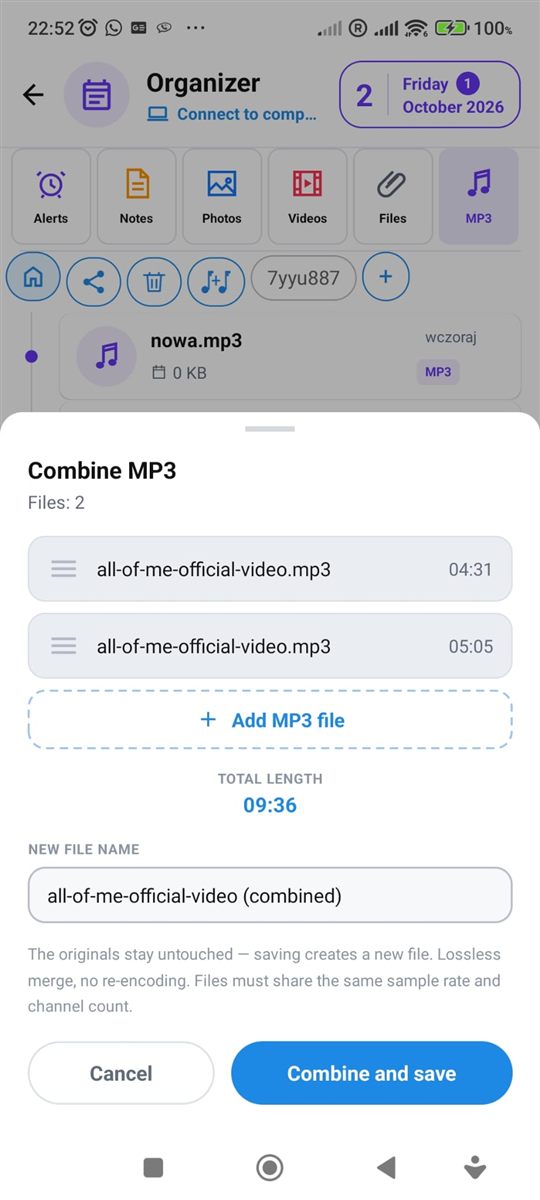
Step by step
All you need is an Android phone and the free PhoneMe app.
- 1Install PhoneMe from Google Play and open the Organizer.
- 2Go to the MP3 tab. If your files aren’t there yet, add them with the green + button.
- 3Press and hold the first file, then tap the others you want to combine.
- 4In the row next to the home button, tap Combine (two notes with a plus).
- 5Drag the songs to set their order and type a name for the new file.
- 6Tap Combine and save. The new file appears in the MP3 tab and the originals stay untouched.
Tip
You can combine MP3 files with the same settings (sample rate and channels) – usually the case for recordings from one source.
Questions
Will the sound quality get worse?
No. The files are joined without re-compression.
Will the original files be deleted?
No. A new file is created and the originals stay untouched.
How many files can I combine?
As many as you need – select all the ones you want to join.