PDF on your phone – merge, split, scan and print
Keep contracts, tickets and documents in the Files tab of the PhoneMe Organizer. Combine several PDFs into one, save chosen pages as separate files, scan a sheet of paper with your camera and print – all on your phone.
Get it on Google Play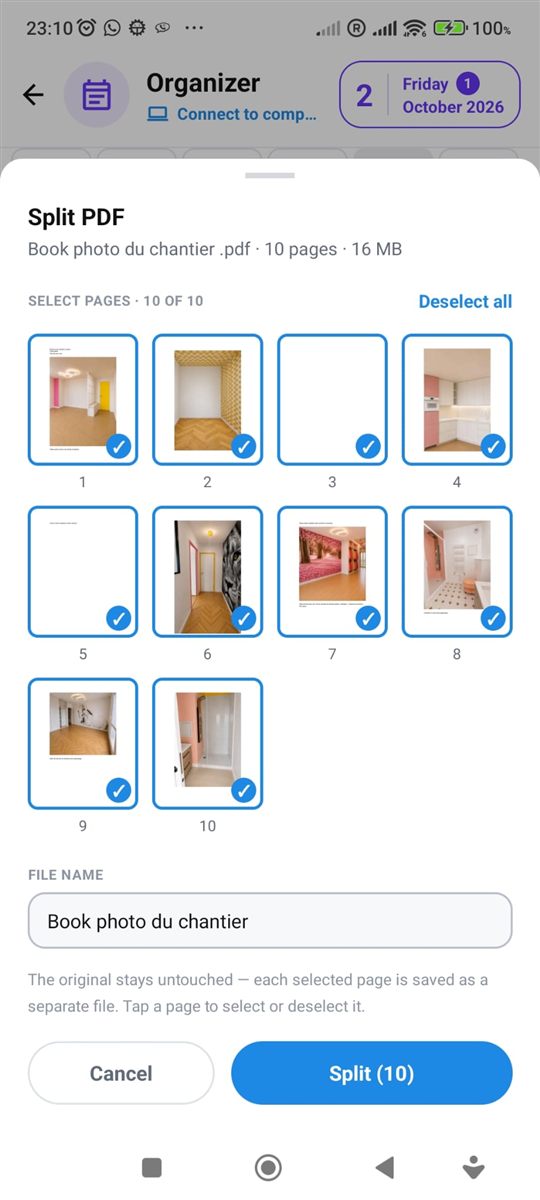
What you can do with a document
No extra apps and no computer.
Merge PDF
Select several files, set the order and save them as one document.
Split PDF
See thumbnails of all pages, pick the ones you need and each one is saved as a separate file.
Scan with your camera
Take a photo of a document and save it as a print-quality PDF.
Print a PDF or a photo on a printer in your Wi-Fi network.
All documents in one place
Sort files into your own folders so you can find a contract or ticket fast.
Files stay on your phone
Documents are not uploaded. A copy on Google Drive is made only if you turn backup on yourself.
Questions – PDF on your phone
Is merging PDF files free?
Yes. Merging, splitting and printing PDF files are part of the free PhoneMe app.
Are my documents uploaded to a server?
No. PDF files are processed on your phone and stay in its storage.
Will the pages lose quality after merging?
No. Pages are copied 1:1, without re-compression.
How do I print a PDF from my phone?
Open the file in the Files tab and tap “Print”. Any printer on your Wi-Fi network will do.